All use cases

Our product · SAP BTP · Clean Core

Hyperion Inspect

AI-assisted inspections in maintenance.
Clarify first, then inspect.

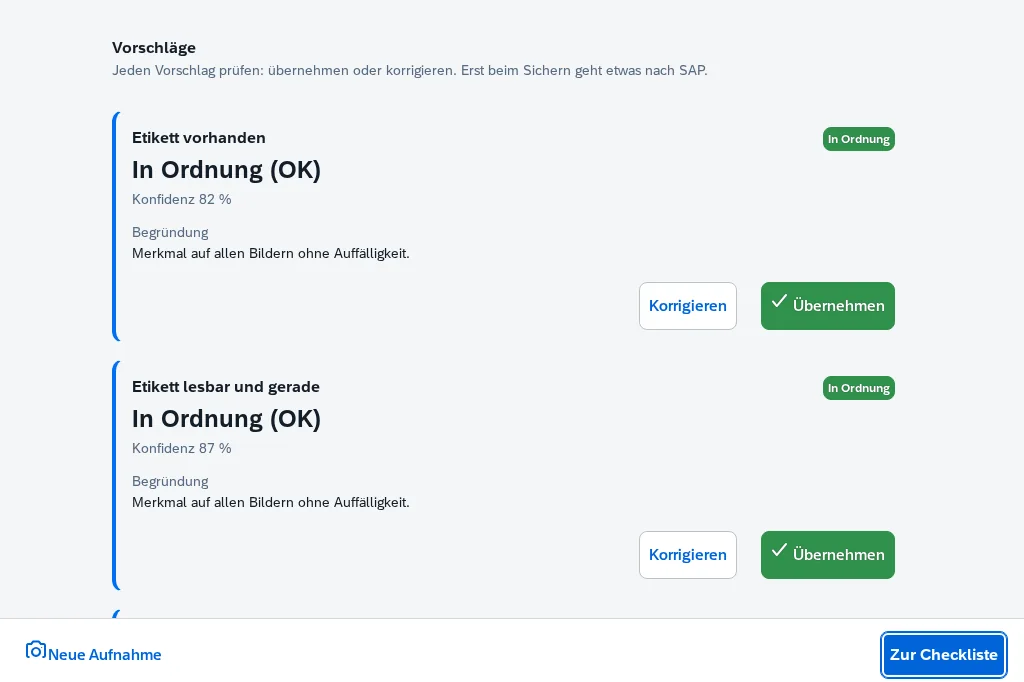
Inspectors capture photos or videos, the AI suggests a result for each inspection characteristic, the inspector confirms – and the result lands in your SAP S/4HANA checklist via released standard APIs. No Z objects, no made-up limits.

  • Clean Corereleased SAP APIs only
  • Evidence in SAPcaptures stored in the SAP standard DMS
  • People decideevery suggestion is confirmed
Scroll

The challenge

“Let the AI look at the photo” fails on characteristics with no image and no standard.

The obvious idea

AI looks at the photo

Inspections are based on inspection plans in SAP QM, and the maintenance order generates the checklist. The inspector takes a photo, and the AI suggests a result for each characteristic. In practice, this quickly hits its limits:

  • Some characteristics can’t be seen in an image – torque, noise, leak tightness.
  • The master record often doesn’t define what counts as OK (“housing undamaged” with no standard).
Our approach

Clarify first, then inspect

  • For each inspection characteristic, clarify: Can it be assessed from an image? Is it maintained well enough?
  • AI suggestions only for suitable characteristics – limits exclusively from SAP.
  • For all others, a worklist: what’s missing and where data cleanup pays off.
  • The inspector confirms every suggestion before anything lands in SAP.

Solution overview

Two apps take you from inspection plan to confirmed result in SAP.

For business departments & QM

Skill Studio

Reads your inspection plans from SAP, classifies each characteristic and uses them to generate validated AI instructions – so-called skills – which your business department tests and approves.

  • Read inspection plans from SAP
  • Classify characteristics
  • Generate, test and approve skills
For inspectors on site

Checklist App

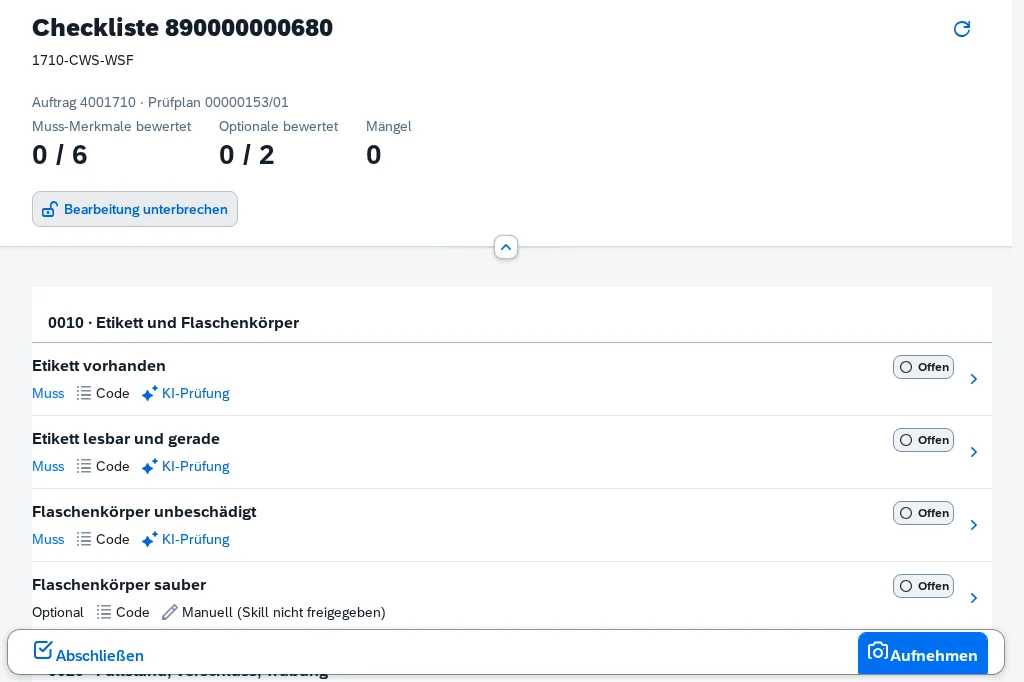
Guides inspectors through the entire checklist – AI characteristics and manual ones. On smartphone, tablet or PC, right at the equipment.

  • Capture a photo or video
  • Accept or correct suggestions
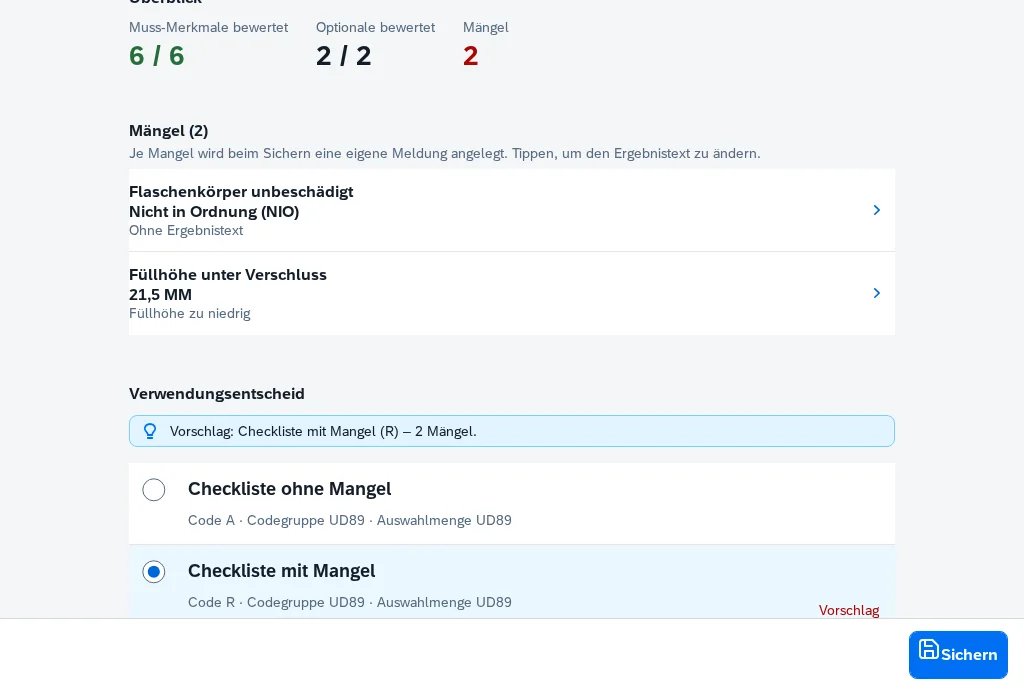
  • Confirm once and save to SAP
  1. 01Read inspection plans from SAP
  2. 02Classify characteristics
  3. 03Generate, test and approve skillsA person approves
  4. 04Inspector captures a photo or video
  5. 05Inspector confirms and savesInspector decides

Step 1 · Analysis run

Two questions per characteristic: Can it be seen in an image? Is it maintained?

For each characteristic, Skill Studio reads the short text, selected set and codes, target values and limits, inspection method and master inspection characteristic. If it’s unclear whether a characteristic can be assessed from an image, that is stated – not guessed.

Question 1 · Image assessability
visual · reading · non-visual · unclear
Question 2 · Data quality
sufficient · thin · insufficient – does the master record define what counts as OK?
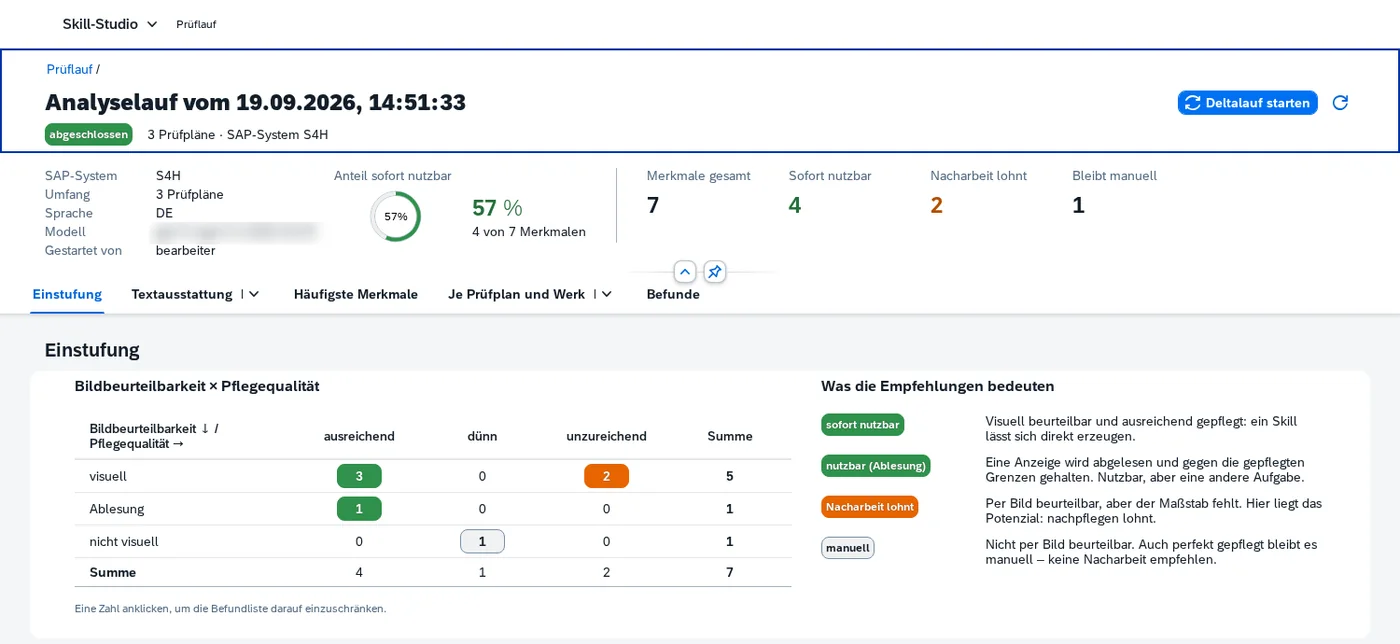
Result of the analysis run

For your inspection plans, you see at a glance where AI helps right away – and where master data maintenance pays off.

  • Ready to usevisually assessable and sufficiently maintained
  • Usable via readingread the display, check against SAP limits
  • Worth reworkingassessable from an image, but the standard is missing
  • Stays manualcan’t be photographed, even when maintained
How large each share is depends on your inspection plans and their data quality – which is exactly what the analysis run shows.
E1visual · sufficientready to use
E2reading · sufficientusable
E3visual / reading · thin or insufficientworth reworking
E4non-visual – can’t be photographed, even when maintainedmanual
E5unclear – the model abstains instead of guessingneeds clarification
Skill Studio: analysis run with a cross table of image assessability and data quality, plus the share of characteristics that are ready to use
Cross table image × data quality: one click filters the findings list. (test data)

A worklist, not a dead end

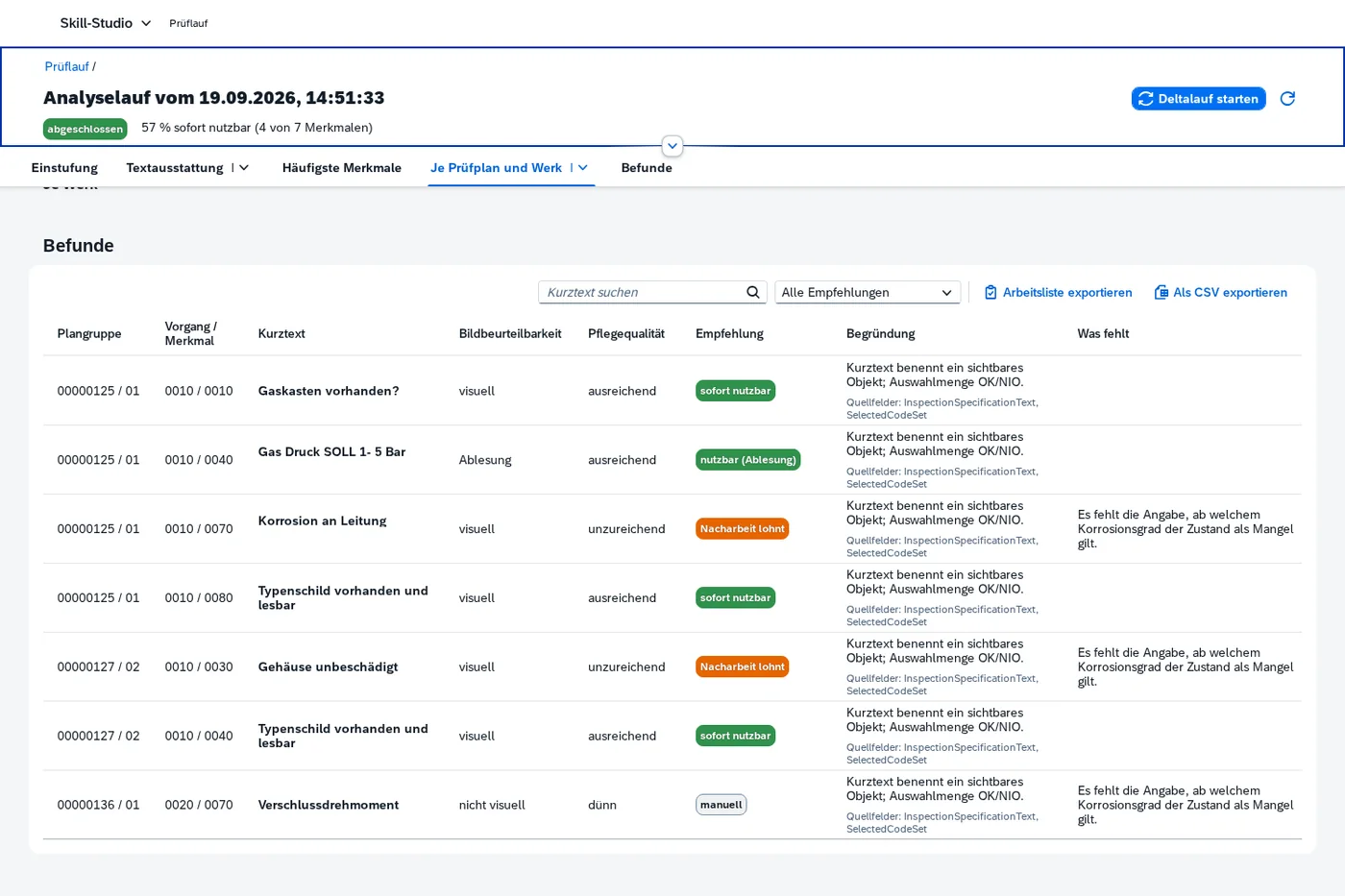
If a characteristic isn’t maintained well enough, no skill is created – instead, there’s an entry with a concrete hint, such as the degree of corrosion at which a defect exists. Export as a worklist and CSV.

Cross table with one click

Image assessability × data quality at a glance. Clicking a number filters the findings list to exactly those characteristics.

Delta run shows progress

After master data maintenance, the delta run reads only what has changed in SAP and shows before and after for each characteristic.

Findings list per inspection characteristic with classification, recommendation, rationale and a note on what is missing in the master data
Per characteristic: classification, recommendation, rationale, source fields and what’s missing. (test data)

Step 2 · Skills & approval

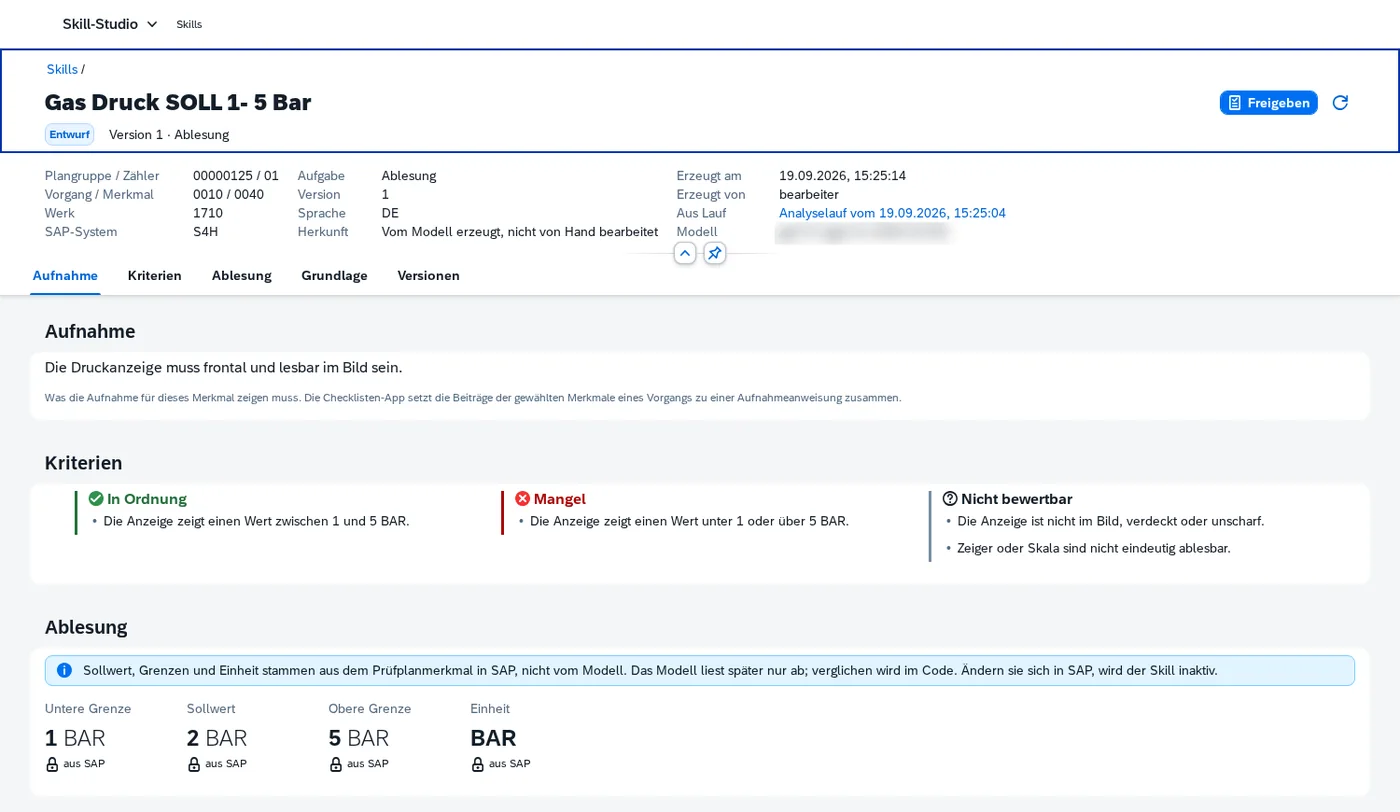
One skill per characteristic type. Limits come from SAP – never from the model.

  • Define once, use everywhere. Identical characteristics share one skill and one approval – across all inspection plans.
  • Locked SAP values. Limits, target value, unit and codes come from SAP, are flagged and cannot be changed.
  • No made-up standard. If the criteria contain a number that doesn’t come from SAP, saving is blocked.
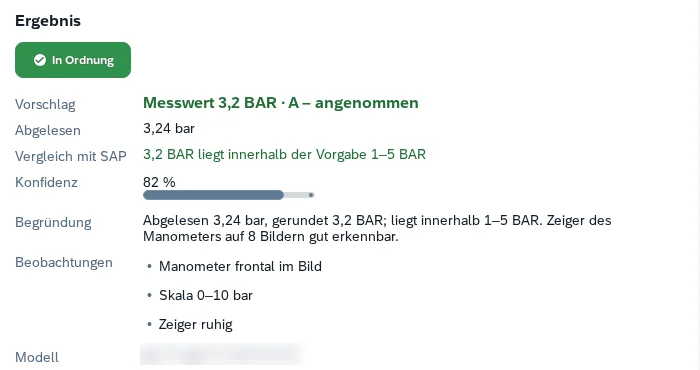
  • Workbench. The business department tests each skill with a photo or video against exactly one version – with test history. Test captures are never stored.
Skill “Gas pressure 1–5 bar” with capture instructions, criteria and limits locked from SAP
Workbench test: read 3.24 bar, rounded to 3.2 bar, within the SAP specification of 1–5 bar, OK
Workbench test: read 3.24 bar, rounded to 3.2 – within the SAP specification of 1–5 bar. (test data)
  1. Draftgenerated from SAP data
  2. Testchecked in the workbench
  3. Approvalby the skill approver role
  4. In useavailable in the Checklist App
  5. Supersededby a new version, or inactive after an SAP change

Step 3 · On-site inspection

An AI suggestion only becomes a result when the inspector clicks.

How a reliable suggestion is created

One call per characteristic

Each characteristic is assessed individually and only according to its skill – characteristics don’t influence each other. Up to 8 images or one video per capture, optionally with a text note from the inspector.

The model judges or reads

For qualitative characteristics, the AI judges: OK, defect or not assessable. For measured values, it only reads: value, unit, legible yes or no.

The code builds the suggestion

The code selects the SAP code or rounds the value and compares it with the SAP limits. If the unit doesn’t match or the inspector’s note contradicts the image, there is no suggestion.

Image sources
  • Smartphone
  • Tablet
  • PC & camera
  • Drones & other image sources can be connected

Save once – in a fixed order

Nothing is written to SAP until the end. Whoever works on a checklist locks the inspection lot; if SAP rejects something, the app stops before the usage decision – saving again doesn’t create duplicates.

  1. 1Confirmationby the inspector – cannot be changed afterwards
  2. 2Resultsto the inspection lot
  3. 3One notification per defectin maintenance
  4. 4Capturesas evidence in the SAP standard DMS
  5. 5Usage decisionfor the inspection lot

Guardrails

Four guardrails – in both apps, without exception.

I

Clean Core

Released standard APIs only, no Z objects, no enhancements. Skill Studio only reads – it never writes to SAP.

II

Captures only in SAP

Photos and videos are stored as evidence in the SAP standard DMS – where the inspection lot and notification live, protected by your SAP authorizations. Never in BTP.

III

No made-up standard

Limits and codes come exclusively from SAP. If the master data isn’t sufficient, no skill is created – instead, there’s an entry in the worklist.

IV

People decide

Skills are approved by a person. The inspector accepts or corrects every AI suggestion – nothing goes to SAP until they confirm.

Architecture & security

One path into SAP. One path to the AI. Everything on SAP BTP.

Device
BrowserSmartphone · Tablet · PC
SAPUI5
SAP BTP · Cloud Foundry
Sign-inApprouter · XSUAA · Roles
Checklist AppCAP · Orders · Checklist · Save
no database of its own
Skill StudioCAP · Analysis run · Skills · Workbench · Assessment
PostgreSQL for runs & skills
AI service · EU region
Your choiceSAP AI Core · Azure OpenAI · your own LLM, e.g. AWS Bedrock
Images are only processed, never stored
Your network
Cloud Connectorthe only path into SAP
SAP S/4HANAQM · Maintenance
released standard APIs only

Four points where your IT can verify clean core and data protection for itself

Standard APIs only

Every SAP access sits in one module that only permits released services – verifiable by searching the code.

Separate roles

Dedicated roles for editing, approving, inspecting and releasing locks. Users who can only edit cannot approve.

Captures only in SAP

No images are stored in BTP. The capture is kept in the SAP DMS, protected by your SAP authorizations.

Real SAP users

Principal Propagation is prepared: calls run in SAP under the user who actually performs the inspection.

Operations: in your landscape or run by us

A

In your system landscape

We deploy Hyperion Inspect to your SAP BTP subaccount – operations and data stay entirely with you.

B

Run by us

We host the apps on our SAP BTP and connect your system via the Cloud Connector – with no operating effort on your side.

Requirements
  • SAP S/4HANA release 2022 or later, on-premise or private cloud, with EAM inspection checklists
  • SAP BTP (Cloud Foundry) and SAP Cloud Connector
  • AI service of your choice: SAP AI Core, Azure OpenAI or your own LLM
In development

Trend alert: the app warns before a measured value reaches its limit.

A measured value can be OK and still have been heading toward its limit for weeks – the temperature of a freezer, for example. Hyperion Inspect calculates a trend line from the last five inspection lots at the same functional location. If it points toward a limit, the inspector sees the history and the remaining margin and can create a notification right away. The assessment itself stays unchanged.

Getting started

Getting started means analyzing your inspection plans. Then you decide.

01

Analysis

Analysis run across your inspection plans with cross table, text coverage and a worklist of characteristics that need master data maintenance.

  • Result: you know which characteristics are suitable and what’s missing.
02

Skills & workbench

Stage 1 plus a delta run after your master data maintenance, skills for suitable characteristics and tests in the workbench with your captures.

  • Approval by your business department
03

Checklist App pilot

Stage 2 plus the Checklist App, storage of captures in the SAP DMS and a pilot with your inspectors – then go-live.

  • Principal Propagation for real SAP users

How we start

  1. 1
    Select inspection plansfor the first analysis run (plant, usage)Your business department
  2. 2
    Clarify accessBTP environment and Cloud Connector to your test systemYour IT
  3. 3
    Perform the analysis runand review the worklist togetherHyperion Edge
  4. 4
    Define the stagebased on the resultstogether

FAQ

What business departments and IT want to know.

Which inspection characteristics are suitable for AI inspection?

Characteristics that can be assessed or read from an image and have a clear standard in SAP. That is exactly what the analysis run clarifies up front for your inspection plans – including a worklist showing where master data maintenance pays off.

Are photos and videos stored in the cloud?

No. Captures are only processed by the AI service, not stored. As evidence, they are stored in the SAP standard DMS – linked to the inspection record and protected by your SAP authorizations. No images are stored in BTP.

Which AI model is used?

You decide: SAP AI Core, Azure OpenAI or your own LLM, for example via AWS Bedrock. Processing takes place in an EU region. Limits and codes always come from SAP – never from the model.

Which SAP systems are supported?

SAP S/4HANA release 2022 or later as an on-premise or private cloud system with EAM inspection checklists. The connection runs via the SAP Cloud Connector.

Are any changes to the SAP system required?

No. Hyperion Inspect is fully clean core: no Z objects, no enhancements. All reading and writing takes place exclusively via released standard APIs.

Can we use drone footage?

Yes – drones and other image sources can be connected. Their captures are assessed per characteristic just like photos and videos from the device and stored as evidence in SAP. We clarify in the project which devices and interfaces fit your environment.

What happens if SAP reports an error when saving?

The app stops before the usage decision. Saving again doesn’t create duplicates. The inspection lot is locked while being edited; others can see who is working on it.

Who makes the final decision?

Always a person. Your business department approves skills, and the inspector accepts or corrects every AI suggestion. The app also only suggests the usage decision.

Hyperion Inspect

Clarify first, then inspect. We start with your inspection plans.

Tell us which inspection plans you’d like to look at first – we’ll get back to you with a proposal for the analysis run.